IndexSearch Setup Checklist
This checklist provides the essential configuration steps required to enable IndexSearch functionality in ADITO systems. Complete these steps in sequence to ensure proper operation of search features and index management.
System Instance Configuration
Enable IndexSearch at the system level to activate the service components and establish basic connectivity parameters.
Module Activation
Navigate to the system configuration through System | <My-System> | Configuration | Modules in the ADITO Designer to configure the core IndexSearch settings.
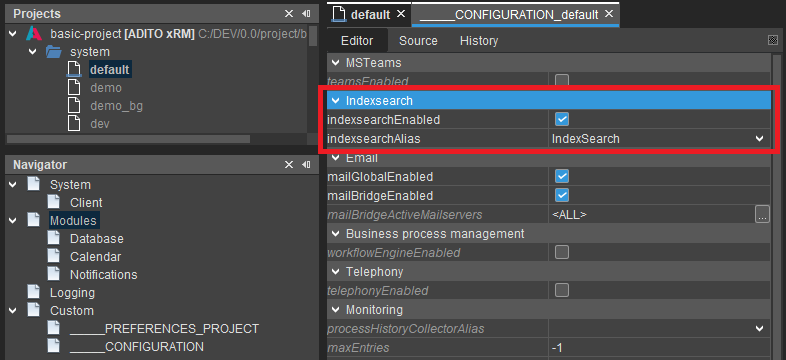 Figure: System configuration showing IndexSearch module settings
The indexsearchEnabled property must be activated (true) to enable all IndexSearch functionality including client search interfaces and JDito search commands. Changes to this setting require active client sessions to be reopened for the global search bar to become available.
Configure the indexsearchAlias property to reference the correct alias configuration. Standard installations use the default alias named IndexSearch.
In managed ADITO systems, operators configure and maintain the IndexSearch alias settings. These configurations should contain all required parameters for system operation.
IndexSearch Alias Configuration
Configure the IndexSearch alias to establish connection parameters between ADITO and the Solr service.
Configuration Location
Access the alias configuration through System | <My-System> | IndexSearch or your custom alias name in the Designer.
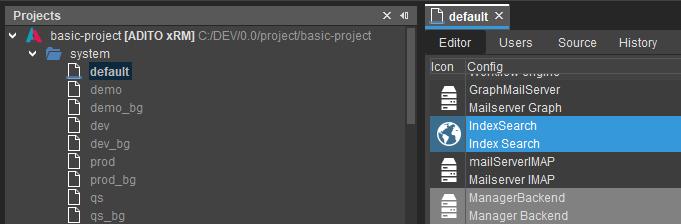 Figure: Location of IndexSearch alias configuration
All changes to alias configuration settings require a system restart to take effect. Plan configuration changes accordingly to minimize service interruption.
Connection Parameters
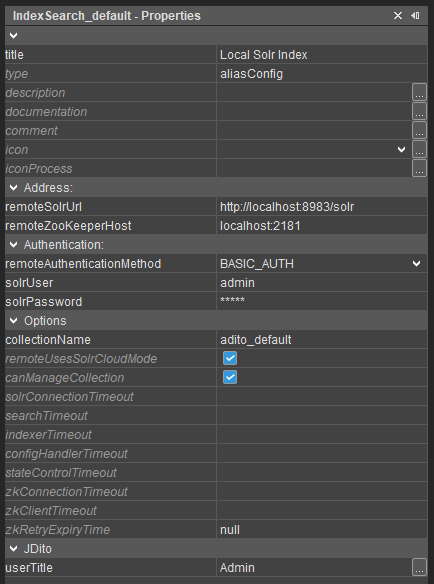 Figure: IndexSearch alias configuration properties
Configure the remoteSolrUrl property with a valid Solr service URL using the format http(s)://<Solr-Host>:<Solr-Port>/solr. Ensure that no trailing whitespace characters are present, as these can prevent successful connection establishment.
Set the remoteZooKeeperHost property using the format <ZooKeeper-Host>:<ZooKeeper-Port> for systems that require external ZooKeeper connectivity. Remove any trailing whitespace characters from this configuration value.
For legacy on-premise installations, verify that the Solr URL is accessible from the ADITO server environment. The configured host must be reachable by all system components including Solr, ZooKeeper, and ADITO server processes.
Authentication Configuration
Configure authentication parameters based on your ADITO version and deployment requirements.
- ADITO 2025
- ADITO 2024
ADITO 2025 systems and managed deployments require basic authentication for all Solr connections.
Set remoteAuthenticationMethod to BASIC_AUTH. Configure the authentication credentials with admin as the default username. Retrieve the password from the System Service Portal under the system's Details tab.
Authentication requirements vary based on deployment type and management status.
For managed systems, configure remoteAuthenticationMethod to BASIC_AUTH with appropriate credentials. Unmanaged ADITO systems from 2024 and earlier versions may not require authentication, allowing remoteAuthenticationMethod to be set to NONE.
Collection Management
Configure collection settings to ensure proper index isolation and prevent conflicts between system components.
For systems with ADITO background servers such as qs_bg or prod_bg, specify a dedicated collectionName to ensure both web and background components use the same collection. Without explicit configuration, the system automatically generates separate collections for each component.
Set the remoteUsesSolrCloudMode property to active (true) for all remote Solr configurations. This setting ensures compatibility with SolrCloud deployments and is required for proper operation.
Configure the canManageCollection property based on your system architecture. For systems using only a single ADITO server or systems without background servers, activate this property (true). For systems with background servers, activate this property only on the background server to prevent configuration conflicts when multiple web pods attempt to reconfigure Solr during startup.
Project Configuration
Configure project-level settings to enable indexing operations and control client search behavior.
Configuration Location
Navigate to project preferences through Preferences | _____PREFERENCES_PROJECT | Modules | Indexsearch in the project configuration interface.
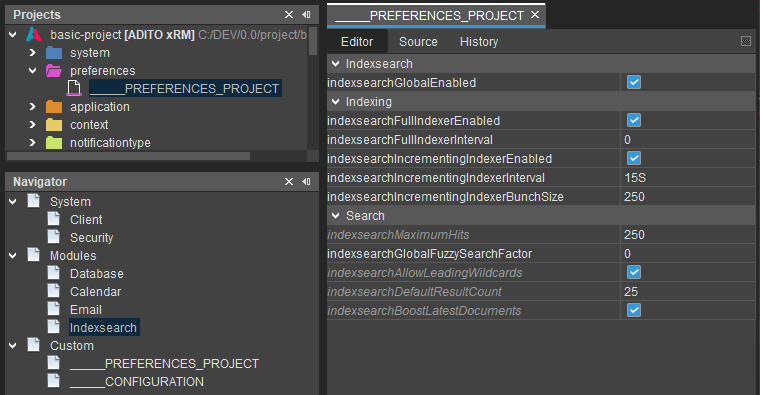 Figure: Project preferences for IndexSearch configuration
Ensure all configuration changes are saved and deployed to the ADITO system before testing functionality.
Core Settings
Activate the indexsearchGlobalEnabled property (true) to enable the global search bar in client applications. This setting controls the visibility of search interfaces for end users.
Enable the indexsearchFullIndexerEnabled property (true) to activate full index rebuilding capabilities. This setting is required for all server processes that rebuild the complete index.
Configure the indexsearchIncrementingIndexerEnabled property (true) to enable continuous index updates based on database audit events. This functionality requires active database auditing to operate correctly.
Set the indexsearchIncrementingIndexerInterval to a value greater than zero to enable periodic incremental indexing. Configure this interval based on system load and update frequency requirements, typically between 15 seconds and several minutes.
Solr Service Configuration
Verify that the Solr service meets the operational requirements for ADITO IndexSearch functionality.
Resource Requirements
Access the Solr Administration UI to review current resource allocation and system status. The dashboard displays active settings and resource utilization information.
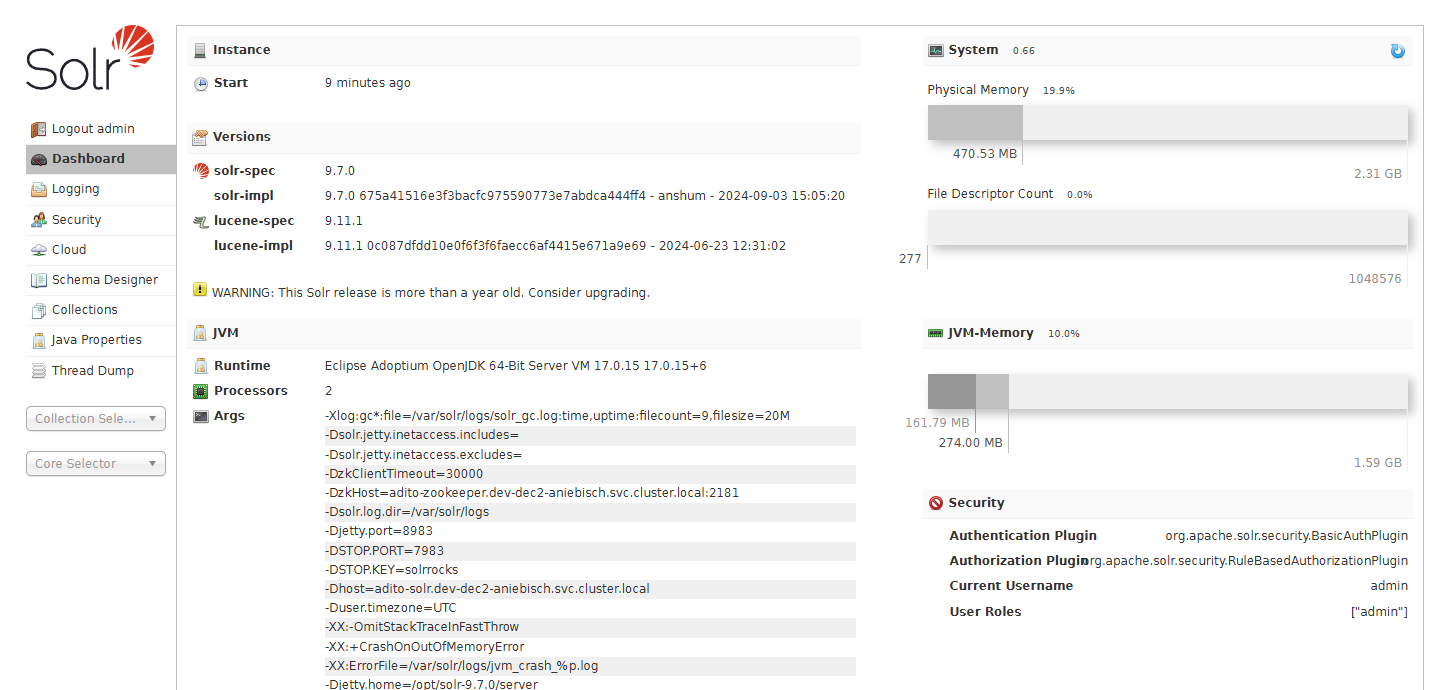 Figure: Solr Administration UI dashboard showing system status
For detailed Solr configuration information, refer to the Solr ADITO Cloud Settings documentation.
Processor Configuration
Solr requires a minimum of 2 processors to operate effectively. Single processor configurations cannot perform garbage collection efficiently, leading to memory consumption issues and potential system crashes.
Configure processor allocation based on environment requirements. Development and test environments should use 2 processors, while quality assurance and production environments require at least 4 processors for optimal performance.
Modify processor allocation using the SOLR_OPTS environment variable:
env SOLR_OPTS="-XX:ActiveProcessorCount=2"
Memory Configuration
Configure Java heap memory allocation based on environment requirements and index size. Development and test environments require 1.6-2 GB maximum memory, while production environments need at least 3.5-4 GB.
Large-scale systems with millions of documents or numerous web pods may require up to 16-32 GB of memory depending on load characteristics.
Configure memory settings through the SOLR_OPTS environment variable:
env SOLR_OPTS="-Xms162m -Xmx1625m -XX:MaxRAM=2353m"
The Xms parameter defines initial heap size, typically set to one-tenth of the maximum heap size. The Xmx parameter sets the maximum heap size, while XX:MaxRAM defines the total JVM memory limit to prevent out-of-memory errors during off-heap operations.
Network Configuration
Configure the SOLR_HOST environment variable to define the hostname or IP address for the Solr instance. This value enables ZooKeeper to establish proper connectivity for request routing.
For SSP systems, use the DNS name of the Solr service, typically following the pattern adito-solr.<namespace>.svc.cluster.local. Ensure that this hostname is resolvable by all system components to prevent connection failures.
Example configuration:
env SOLR_HOST="adito-solr.my-system.svc.cluster.local"