Settings and Properties
This article is unfinished and will be updated soon. The contents are either incomplete or subject to change.
Instance Configuration (____CONFIGURATION)
-
Check if the indexsearch is active in the instance configuration.
Location: (System | <My-System> | _____Configuration | Modules).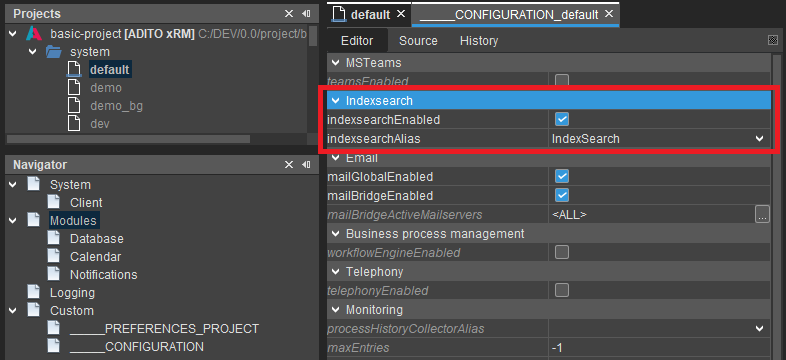
indexsearchEnabledmust be active (true).indexserachAliasmust be set to the alias used by the system. In most systems this is the provided default alias namedIndexSearch.
In managed systems the alias configuration of the Indexsearch will be configured by the operator and thus should contain the correct and required settings for the system.
General Properties
indexsearchEnabled
Property description:
Enables index lookup for both the client and JDito commands (indexsearch.search()).
- It must be active to use the indexsearch, global user search and indexed based lookup fields.
- Changing this setting at runtime will cause all related system pods to either shut down or start the indexsearch component of the ADITO server.
- Changing this setting will not cause the global search bar to be enabled or disabled for active client sessions.
- The change requires reopening the session or a new login of the affected active user to be visible in the client.
indexsearchAlias
Property description:
Sets the alias on which the indexSearch should operate.
- For the indexsearch to work, a valid alias must be set for this property.
- Changing this setting at runtime will have no effect until either the indexsearch component itself or the system is restarted.
Expert Properties
indexsearchGroupUpdateInterval
Property description:
Defines the interval in which the indexsearch will check for changes in subGroups of all active index groups.The update will trigger a rather expensive call to the search engine in order to load all available subgroups from the underlying index. Default is one minute (1M), which is also the minimum.
NOTE: For the changes to the property, to take effect, either the server or the index search must be restarted.
- This setting should only be changed when memory and system load problems occur on the Solr, while running an ADITO system with a large number of pods and many index documents.
- For example, a System running with 30+ ADITO web-pods using an index with 10+ million documents.
indexsearchGroupUpdateRandomDelay
Property description:
Defines an additional random factor which will be applied to the group update interval of each server instance.This will cause each server to perform the group updates at different times, which can help increase the stability of the underlying search service. The factor defines the maximum mount of seconds that will be subtracted from the original update interval. In order to work propertly, the range must be smaller than the update interval, and the update interval itself must be set to value greater than the minimum interval. Otherwise, this can cause the update interval to always use the minimum interval of 1 minute. Default is 0 for no delay.
For example, if the update interval is set to 3 minutes (3M) and this delay to 10 seconds (10S), then it will case each ADITO server of the system to perform the update within the individual interval between 2 minutes and 50 seconds and 3 minutes.
NOTE: For the changes to the property to take effect, either the server or the index search must be restarted.
- This setting should only be changed when memory and system load problems occur on the Solr, while running an ADITO system with a large number of pods and many index documents.
- For example, a System running with 30+ ADITO web-pods using an index with 10+ million documents.
ADITO Debug Flags
The ADITO system provides a number of debug flags that can be used to troubleshoot problems with the index search. The debug flags can be enabled in the (System | <My-System> | _____Configuration | Logging)
- All debug flags for the indexsearch are disabled by default.
- Logged information is written to the GrayLog of the ADITO system.
| Debug Flag | Description |
|---|---|
INDEXSEARCH | Logs general information for each query, indexing task and reconfiguration of the indexsearch component. |
INDEXSEARCH_QUERY | Logs additional detailed information for each search operation of the indexsearch. This will log the full search query including filters. |
INDEXSEARCH_INDEXER | Logs additional detailed information for all indexers. This will log individual documents send to the index. |
INDEXSEARCH_EXTENDED | Logs detailed information for all index related operations. |
Indexsearch Alias Configuration
Location
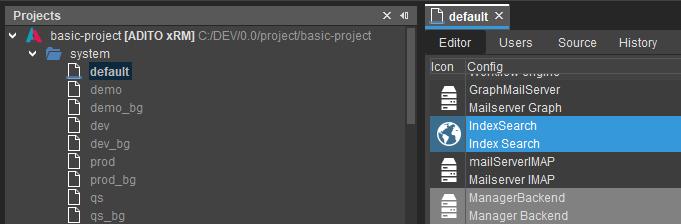
Check the alias configuration of the Indexsearch alias for incorrect settings.
Location: (system | <My-System> | IndexSearch or custom alias)
Properties
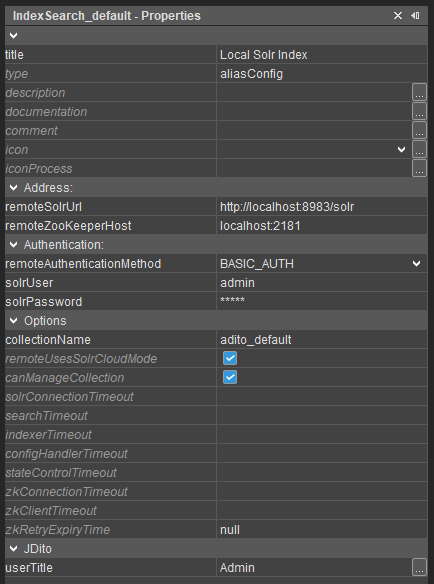
remoteSolrUrl
Property description:
The URL of the external SolrServer.The URL must point to the base address ( default: /solr ) of the Solr server. Example:
http://localhost:8983/solr
If a SolrCloud is used, it is possible to set multiple URLs as a comma separated list. Example:http://localhost:8983/solr, http://localhost:7743/solr}
- Check if the
remoteSolrUrlis set and configured correctly.- The value must be a valid URL with the format
http(s)://\<Solr-Host>:\<Solr-Port>/solr - Remove all trailing whitespaces if present.
- The value must be a valid URL with the format
Legacy On-Premise- Also check if the Solr URL is actually reachable from the ADITO server side. (Pod, Container)
- The configured
SOLR_HOSTof the Solr service (Pod, Container) must be reachable for the Solr, ZooKeeper and ADITO server.
remoteZooKeeperHost
Property description:
The address of the zookeeper, which manages the SolrCloud.
Required the IP-Address and port of the zookeeper. Example: "localhost:9983"
- Check if the
remoteZooKeeperHostis set and configured correctly.- The value must be a string with the format
\<ZooKeeper-Host>:\<ZooKeeper-Port> - Remove all trailing whitespaces if present.
- The value must be a string with the format
remoteAuthenticationMethod
Property description:
The authentication method used to access the remote Solr server.
- Check if the correct authentication method and login data are used. Managed and ADITO 2025 or higher systems always require basic auth.
- Check if the
remoteAuthenticationMethodis set toBASIC_AUTH. - The default user for manged systems should be
admin. - The password van be looked up in the SSP under the Details tab of the system.
- Older unmanaged ADITO systems (2024 and earlier) don't require authentication so
remoteAuthenticationMethodmust be set toNONE
- Check if the
solrUser
Property description:
The username for the authentication.
- The default user for manged systems should be
admin.
solrPassword
Property description:
The password for the authentication user.
- The password van be looked up in the SSP under the Details tab of the system.
collectionName
Property description:
The name of the solr collection in which the index is stored.If empty, a collection with a generated default name will be used.
The generated name follows the pattern{projectName}_{system}, for examplebasic2020_defaultorbasic2020_prod. If no project name was defined, the collection name is equal to the system name. Example: default or prod.IMPORTANT: The server will create a new index when the name of the collection is changed. The previous index will not be deleted.
-
For systems with a ADITO background server, e.g.
qs_bgorprod_bga dedicatedcollectionNamemust be specified.- This is necessary so that both the web server and bg server use the same collection.
- Per default the name of the collection is generated with the pattern
\<Project-Name>_\<System-Name>resulting in the creation of two collections, e.g.basic_qsandbasic_qs_bg, if not specified. - Check if the collection name contains illegal characters.
- The name must begin with a letter (
[a-zA-Z]). - The name can only consist of letters, numbers and underscores (
[a-zA-Z][a-zA-Z0-9_]). - Valid values:
myCollection,adito_2025,basic2024,xRM_basic_2025_qs, ... - Invalid values:
2025,_basic,_2025,adito_2025.1,adito@index, ...
- The name must begin with a letter (
tipCanary systems, like neon and neon2, can also specify and use the same collection name as the main system if both ADITO versions use the same Solr version and ConfigSet. See the Versions and Dependencies page for information regarding the Solr versions used.
remoteUsesSolrCloudMode
Property description:
Sets the API, which is used to communicate with Solr.
falseThe old Core-API is used. Required for non-cloud Solr servers.trueThe Collections-API is used. Required for SolrCloud systems.
- Check if the
remoteUsesSolrCloudModeis set to active (true).- This setting defaults to
trueand should not be changed. It will be removed in future releases. - ADITO no longer supports the core mode when using a remote Solr service. It only works if a Solr cloud system is used.
- This setting defaults to
canManageCollection
Property description:
Specifies whether the ADITO server may create the collection of the index and update the contained schema with patches. The default is true.
If the option is deactivated, the server can only add new fields for an existing index to the schema.
- Check if
canManageCollectionis configured correctly. It controls if the corresponding ADITO server(s) of the system is allowed to create the Index and update the ConfigSet.- For systems using only a single ADITO server or without a ADITO background server (
*_bg) this property must be active (true). - For systems with a background server (
*_bg) this flag must only be active on background server. The web system which can have many pods can cause the solr to fail and the collection to be corrupted if all pods try to reconfigure the Solr on startup, thus this must be deactivated on all web pods.
- For systems using only a single ADITO server or without a ADITO background server (
Make sure that the alias configuration in both, the web system (e.g. qs) and the background server (e.g. qs_bg), use the same settings.
The only exception should be the canManageCollection flag which should only be active in the background server.
solrConnectionTimeout
Property description:
The connection timeout for the connection to the Solr server. The timeout is used for all Solr clients of the index search. Default is one minute (1M). If the value is not set, 0 or negative, the default timeout is used.
searchTimeout
Property description:
The timeout for search queries. Default is 10 seconds (10S). If the value is not set, 0 or negative, the default timeout is used.
indexerTimeout
Property description:
The timeout for requests from the indexer. Default is 5 minutes (5M). If the value is not set, 0 or negative, the default timeout is used.
configHandlerTimeout
Property description:
The timeout for requests to configure the index. This applies to all requests for creating the index and for updating the schema and other configurations. Default is 10 minutes (10M). If the value is not set, 0 or negative, the default timeout is used.
stateControlTimeout
Property description:
The timeout for the index status check. The status check is used to determine whether the index and the external service can still be used, which is why the timeout should be set to a low value. Default is 5 seconds (5S). If the value is not set, 0 or negative, the default timeout is used.
zkConnectionTimeout
Property description:
The connection timeout for the connection to the ZooKeeper. The timeout is used for all Solr clients of the index search. Default is 30 seconds (30S). If the value is not set, 0 or negative, the default timeout is used.
zkClientTimeout
Property description:
The timeout for requests to the ZooKeeper. The timeout is used for all Solr clients of the index search. Default is 15 seconds (15S). If the value is not set, 0 or negative, the default timeout is used.
zkRetryExpiryTime
Property description:
The time span in seconds that must be waited before the status of the ZooKeeper cluster can be retrieved again. The value is used for all Solr clients of the index search. Default is 5 seconds (5S). If the value is not set, 0 or negative, the internal default wait time is used.
userTitle
Property description:
User title in whose context JDito processes will be executed. In some instances processes can't be executed if nothing is configured. Example: Admin
- It is required to set this value if any of the JDito processes executed by the indexer use session or user-related features.
- This is the case if features of
system.entityorsystem.toolsare used inside any of the processes.
- This is the case if features of
- This setting must be set to a valid system user that has permissions to access all data related to the index.
- For example, a user having the role
INTERNAL_ADMINISTRATOR.
- For example, a user having the role
Project Preferences
List of all available project preferences for the index search, as of ADITO 2025.2.x.
Location
Check the project preferences of the Indexsearch for incorrect settings.
Location: (preferences | _____PREFERENCES_PROJECT | Modules | Indexsearch)
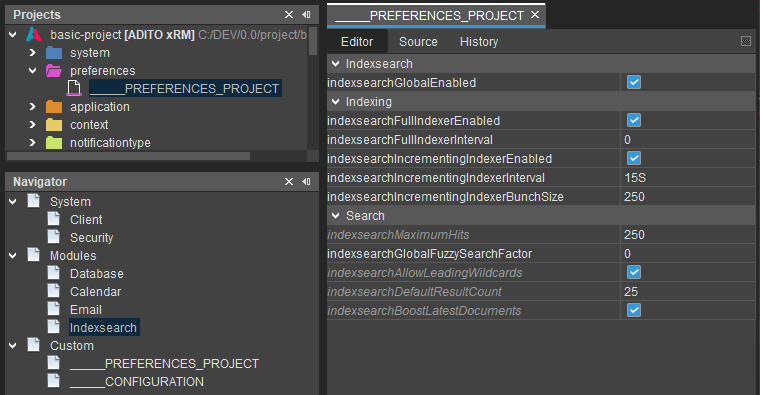
General Properties
indexsearchGlobalEnabled
Property description:
Sets whether index lookup is available in clients. If this setting is disabled, the index search field disappears from the clients for the users. However, you can still run evaluations withindexsearch.search().
- This setting defaults to
true - It must be active if the users should be able to use the search bar in the client.
- Changing this setting will have no effect on active client sessions.
- The change requires reopening the session or a new login of the affected active user.
indexsearchFullIndexerEnabled
Property description:
Enables the full-text index. This should only be used for the initial structure of the index, because otherwise performance problems can occur. All data stored in the index configuration is read from the database and stored on the hard disk.
indexsearchFullIndexerInterval
Property description:
The interval at which the full-text index is updated. In almost all cases, the interval should be "0" and indexearchFullIndexerEnabled should be checked, since the indexer can be triggered via indexsearch.runIndexer().
indexsearchIncrementingIndexerEnabled
Property description:
Enables the incremental index. This updates the index with the changes that have been made at a specific interval (indexsearchIncrementingIndexerInterval). Only small areas are updated here, not the entire index.
indexsearchIncrementingIndexerInterval
Property description:
The interval at which the incremental index is updated. The minimum value that can be set is one second (1S), the recommended minimum value is 15S. If "0" is entered here, the indexer is not active.
indexsearchIncrementingIndexerBunchSize
Property description:
The number of data packets that the incremental index enters in a turn.
indexsearchMaximumHits
Property description:
Number of maximum search results displayed in the index search. Since the index search should only give an overview, you should not enter too large values here. Because the index always sets the result set to the size of the maximum hits and then takes the search results, it can also lead to performance degradation in this field. This setting is overridden by indexsearchDefaultHits, should indexsearchMaximumHits be the greater value. indexsearchMaximumHits is only relevant for indexsearch.search() and causes you to be able to filter only up to the specified number.
indexsearchAllowLeadingWildcards
Property description:
Allows leading wildcards (criterion). If this is not allowed, only the following wildcards (criterion) are accepted
indexsearchDefaultResultCount
Property description:
Sets the default amount of hits, if in JDito a specific count is not given. Has to be lower or equal to indexsearchMaximumHits.
indexsearchBoostLatestDocuments
Property description:
If enabled newer documents get a boost to score higher than older documents.
- This feature is based on the system field
#DATE(_date_) which can be added by every index group. - Index groups that don't fill the system field are not boosted.
Expert Properties
List of all available expert properties for the index search, as of ADITO 2025.2.x, that can be configured in the project preferences.
indexsearchGlobalUseRankedSearch
Property description:
Specifies whether the client's global lookup component performs the weighting of each document, based on the boost settings of each index group. The default istrue.
Deactivating the setting
- will case the search to no longer use query boosts options specified in the entities for each index group.
- can increase search performance for bigger indexes at the cost of the hit precision.
- reverts the search behavior to that of ADITO 2022.0
indexsearchGlobalFilterExtensionHandlingMethod
Property description:
Specifies how unknown filter extensions are handled in the overall index search. Default is FAIL.This setting applies to the client's index lookup and the search via JDito
indexsearch.search.IMPORTANT: This does not affect entities or any consumer using an index record container. They will always fail on unknown pattern extensions, since they evaluate all extensions specified in the record container.
WARNING: If filter extensions are used in the permissions, the setting will most likely bypass the application of the filters for the index search if not set to
FAIL.Corresponding patternExtensions must be defined in the index groups, which apply the missing permissions to the index search.
Options:
FAIL: The index search will not return any results and throws an exception while searching via JDito.SKIP: The index search skips all unknown filter extensions. The search is performed, but the skipped filters are not applied, returning more results than intended.AS_FIELD: The index search will treat any unknown filter extension as an index field. The search will throw an exception if no such field is defined for the affected index groups.NOTE: This option will probably no longer be available when the entire index search can evaluate filter extensions.
indexsearchInitWaitTimeout
Property description:
Sets the maximum amount of time a running index component, e.g. the full indexer, is waiting for the index search to reinitialize, before canceling the planed execution. The default is 10 seconds. The maximum is 5 minutes and all values greater than this will result in a timeout of 5 minutes being used. If the specified timeout is equal or smaller than 0 not timeout will be used.
indexsearchGlobalDefaultOperator
Property description:
Sets the default operator of the index search for the global search. The default is OR for the optimized user search with ranking. If the old search without ranking is used, AND is used as the default operator. If the one value is set, the specified operator is always used as default operator for global search. The operator is used for user input only and has no effect on internal filter or boost patterns of the search.
indexsearchGlobalOnlyCountSelectedGroups
Property description:
Specifies whether the counters for index groups should only be displayed for selected groups in the global search. Default is false. The display then does not show any counters for the unselected groups. The search is then only carried out once without having to evaluate the permissions for all global index groups. This improves performance for large indexes and systems with complex permissions.
indexsearchIndexerMaxBufferedDocs
Property description:
The maximum amount of index documents the indexer can buffer before sending them to the index. Default is 256. The setting applies to all indexers Setting this option to 0 or less, will cause the indexer to use the default.WARNING: Specifying a too large amount, can lead to high memory consumption when indexing large indexes and can end up in an OOM error. Specifying a too small amount, will result in a longer indexing time.
indexsearchIndexerBufferSizeLimit
Property description:
The memory limit in bytes of the indexers internal document buffer. Default is 512 MB. If the specified limit ist reached or exceeded during indexing the indexer will send all currently buffered documents to the index, ignoring the specified document limit (default 256). The setting applies to all indexers.The smallest possible limit supported by the indexer is 5 MB (5242880), all specified positiv values below this limit will result an effective limit of 5 MB. Setting this option to 0 or less deactivates the limit. WARNING: When specifying a limit that is too large or deactivating the option, can lead to high memory consumption when indexing large indexes with binary data and can end up in an OOM error. The lower the limit, the slower the indexer will be when indexing larger content, e.g. if the index group contains binary data. NOTE: This properties editor is a simple long editor, allowing to specify memory values greater then 2 GB. The value must specify the actual amount of bytes. e.g. 512 MB = 512 * 1024 * 1024 = 536870912 bytes IMPORTANT: This option does not limit the actual amount of memory used by the indexer in any way. It only forces the indexer to flush and commit all index documents, that are currently buffered, when the specified limit is exceeded. This will only free the memory used by the buffer. This option has no effect on the memory usage of the database requests a processes used to create the resulting index documents.
indexsearchIndexerWarnOnSkippedDBRows
Property description:
Specifies whether the indexer should log a warning if records of the database were skipped during indexing. Default is true. This occurs if the SQL of the indexer returns records for a different UID than specified in the indexer. For example, this applies to the affectedIds of the incremental indexer. The warning is logged to indicate a possibly incorrect SQL for the indexer of an index group. The FullIndexer ignores this limit because there are no restrictions for the UIDs.
indexsearchIndexerDBRowsForDocumentWarningLimit
Property description:
Returns the limit for the indexer, above which a warning is logged that too many db columns are read for a single record. The default is 200 db columns per record. The limit refers to the read db columns for a single UID of an index document and used only when the records for an index document are read out via a SQL query. When the limit is reached, a warning is logged that the given SQL query may have an error for the affected index group, causing too many columns to be read out for a single UID. This waning can help to detect problems in the SQL of the indexer at an early stage. The limit applies to all indexers (Full and Incremental). If the value is set to less 0 or less, no warnings are logged.
indexsearchGlobalUseLanguageFallback
Property description:
Specifies whether the global search, for a multilingual index, should search the system's default language in addition to the client language. Default is true.
indexsearchGlobalMinTermSizeForWildcards
Property description:
Defines the minimum length that an input value of the global search must have, so that the extension with wildcards is applied for the value. Default is 0 for no limit.
indexsearchGlobalFuzzySearchFactor
Property description:
Returns the factor used by the fuzzy search. The factor determines whether and how many character permutations the fuzzy search may perform for individual terms. The default is 1. NOTE: The setting is only applied if the ranked search is used. indexsearchGlobalUseRankedSearch Valid values are: 0: The fuzzy search is deactivated. 1: The fuzzy search performs one permutation. 2: The fuzzy search performs two permutations.
indexsearchCachePatternExtensions
Property description:
Specifies whether the filter patterns of the PatternExtensions should be cached by the index for later reuse of the results. Default is true.
indexsearchCachePermissionFilters
Property description:
Specifies whether the filter patterns for the permissions should be cached by the index for later reuse of the results. Default is true.
indexsearchJDitoResultFieldArraysAsString
Property description:
Defines whether results, for fields with multiple values, should be returned as a string instead of an array. Affected are all IndexRecordFields where the property isMultiValued is set. This only affects the result of the search via JDito, using indexsearch.search() or indexsearch.searchIndex(). Default is false. If set to true, all arrays will be returned as strings, with the form "[value1, value2, ..., valueN]". If false, the values are returned as native arrays.
- Flag to support older processes from ADITO 2021.2 or older projects using this feature.
- Should only be used if problems occur after a project update and only to temporary support and update the processes later.
indexsearchCJKOptimizationEnabled
Property description:
Controls the advanced optimization for CJK inputs of the index search. Default is true. If the flag is active, additional search options, such as word shingles, additional phrases and separate wildcard settings are used for CJK entries. The individual options can be configured in more detail via the corresponding expert parameters.
indexsearchCJKOverrideUserWildcards
Property description:
Specifies whether other wildcard settings should be used for CJK terms. Default is false. If active, the wildcards for CJK terms are determined by the two settings indexsearchCJKApplyLeadingWildcards and indexsearchCJKApplyTrailingWildcards, instead of the default user setting.
indexsearchCJKApplyLeadingWildcards
Property description:
Specifies whether leading wildcards should be added to CJK terms. Default is true
indexsearchCJKApplyTrailingWildcards
Property description:
Specifies whether trailing wildcards should be added to CJK terms. Default is true.
indexsearchCJKCreateShingles
Property description:
Specifies whether shingles are to be generated for CJK terms. Default is true. The length of the generated shingles is set via the corresponding parameters indexsearchCJKMinShingleSize and indexsearchCJKMaxShingleSize. The shingles are generated only for terms, greater or equal, of the set minimum length. The minimum term length can be set via the parameter indexsearchCJKMinTermSizeForShingles.
indexsearchCJKMinTermSizeForShingles
Property description:
The minimum length for CJK terms from which shingles are generated. Default is 4.
indexsearchCJKMinShingleSize
Property description:
The minimum length for the generated shingles for CJK terms. Default is 3.
indexsearchCJKMaxShingleSize
Property description:
The maximum length for the generated shingles for CJK terms. Default is 4.
indexsearchCJKCreatePhraseTerms
Property description:
Specifies whether additional phrases should be generated for CJK terms for the individual terms. Default is true.
indexsearchCJKOnlyUsePhraseTerms
Property description:
Specifies whether all terms are to be evaluated as phrases for CJK terms. Default is false.
indexsearchUseRemoteParameterSets
Property description:
Specifies if the index should use parameter sets that are managed by the remote service. Default is true. If enabled, the default, all field aliases used during a search will be stored on the remote service and are only referenced in the query. This reduces the length of the used URL of the search request. If disabled, all needed field aliases for the search are send in as a URL parameter of the search request. This can case an exception caused by exceeding the max length of a URL, if to many field or languages are used for the index.
indexsearchAutoCommitEnabled
Property description:
Specifies if pending updates of the indexer will be automatically pushed to the index. The default is true. If the auto commit flag is set to false, then only explicit commits will update the index. This setting should only be set to false if the whole index contains less then 30000 documents
indexsearchSoftAutoCommitEnabled
Property description:
Specifies if the indexer performs a 'soft commit', meaning that Solr will commit your changes to the Lucene data structures quickly but not guarantee that the Lucene index files are written to stable storage. The default ist false. This is an implementation of Near Real Time storage, a feature that boosts document visibility, since the Searcher does not have to wait for background merges and storage to finish. Note, when using 'soft commits' and the index server crashes, all not fully committed documents are lost, even if there were visible for the searcher.
indexsearchAutoCommitMaxTimeMS
Property description:
The number of milliseconds since the oldest uncommitted update of the indexer.
indexsearchAutoCommitMaxDocs
Property description:
The number of updates that have occurred since the last commit of the indexer.
indexsearchUseSearchableTitleField
Property description:
Specifies if the system field #TITLE (_title_) of the index search can be searched. The default is false. This option affects all index groups and enables the isIndexed flag of the system field. When changing this setting, the index must be rebuilt for it to take effect.
indexsearchUseSearchableDescriptionField
Property description:
Specifies if the system field #DESCRIPTION (_description_) of the index search can be searched. The default is false. This option affects all index groups and enables the isIndexed flag of the system field. When changing this setting, the index must be rebuilt for it to take effect.
Solr ADITO-Cloud
Settings related to the Solr and ZooKeeper instances in the ADITO-Cloud. This section only focuses on the settings that are relevant for the Solr instance since the ADITO Operator manages the ZooKeeper instance. Older and unmanaged ADITO-Cloud environments don't have a dedicated ZooKeeper instance and use the embedded ZooKeeper instance of Solr.
The active settings of the Solr instance can be found in the dashboard of the AdminUI.
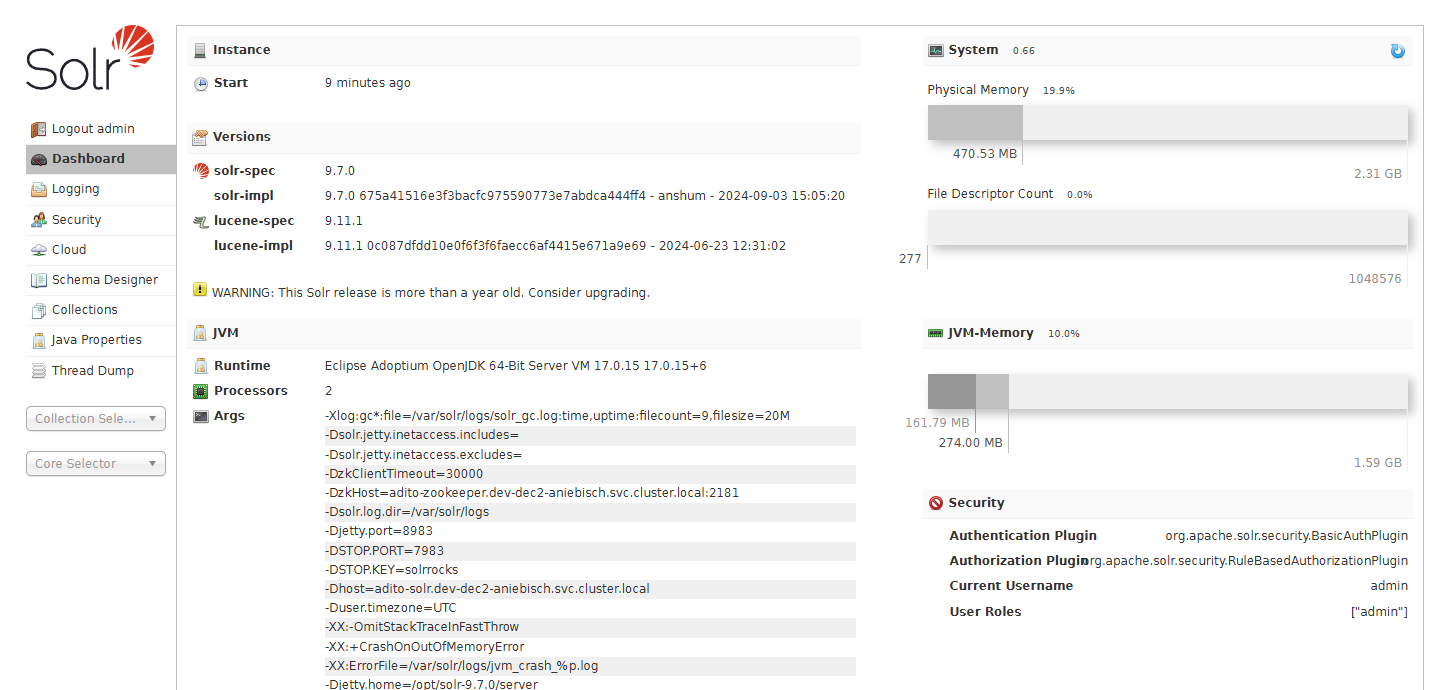
For more information on the AdminUI, see the Solr AdminUI reference page.
Most relevant settings can be found in the section Args of the dashboard, which contains all settings that are passed to the Solr instance.
Common settings
Settings affecting the JVM used by the Solr instance must be specified using the SOLR_OPTS environment variable.
Otherwise, the settings will not be applied.
The SOLR_OPTS environment variable must be defined on startup of the Solr instance and can contain multiple settings separated with spaces.
SOLR_OPTS="-Xmx1024m -Xms1024m -XX:MaxDirectMemorySize=2048m -XX:ActiveProcessorCount=2"
Processors
For the Solr to run without problems, the processor count must be at least 2.
If the processor count is 1, the Solr cannot perform the Garbage Collection efficiently, which leads to high memory consumption, long and stagnating request times and in the worst case crashes du to OOM errors.
- For
devandtestenvironments, the processor count should be set to 2. - For
qsandprodenvironments, the processor count should be set to at least 4.
The processor can be seen directly in the dashboard of the AdminUI.
To change the processor count of the Solr instance the SOLR_OPTS environment variable must be used.
env SOLR_OPTS="-XX:ActiveProcessorCount=2"
JVM-Memory
The memory settings for the Solr instance can be found in the dashboard of the AdminUI. This shows the current Java heap size and the maximum Java heap size used by the Solr instance.
- For
devandtestenvironments, the max memory should be set to 1,6–2 GB. - For
qsandprodenvironments, the max memory should be at least to 3,5–4 GB. - For systems with a large index or a large number of web-pods, more memory might be required.
- A single solr instance can require up to 16 GB of memory, in rare cases up to 32 GB.
- An index can be considered large if it contains millions (~4 M or more) of documents or uses a large number of fields (~200 or more) in the schema.
- If the number of web-pods is equal or greater than 20, it can be considered a large system and may lead Solr to require more memory to handle the load.
The memory settings can be changed using the SOLR_OPTS environment variable.
env SOLR_OPTS="-Xms162m -Xmx1625m -XX:MaxRAM=2353m"
- The
Xmssetting defines the initial Java heap size and mostly set to at least a tenth of the maximum Java heap size. - The
Xmxsetting defines the maximum Java heap size. - The
XX:MaxRAMsetting defines the maximum memory that can be used by the JVM.- This should be set to a value higher than the maximum Java heap size.
- Solr performs some actions off-heap and requires more memory than the maximum Java heap size. Defining this can prevent OOM errors und full system load.
- This setting is most important when using the embedded ZooKeeper instance of Solr.
SOLR_HOST
The SOLR_HOST environment variable defines the host name or IP address of the Solr instance.
This value is used by the ZooKeeper instance to connect to the Solr instance.
For SPP systems should be set to the DNS name of the Solr instance.
- The DNS name of the Solr should normally start with the pod name
adito-solrfollowed by the namespace of the system. - Example:
http://adito-solr.my-system.svc.cluster.local
The specified host must be resolvable by the ZooKeeper instance, otherwise the ZooKeeper will fail to redirect incoming requests to the Solr. Thus causing the ADITO servers to fail in establishing a connection to the Solr and rendering the index search unusable.
Solr data directory
This folder contains all indices and configuration files of the Solr instance. For configuration files managed by the ZooKeeper this folder will contain a copy of the files.
This folder should be mounted as a persistent volume, otherwise all index data will be lost after a restart of the Solr instance.
This setting is not directly visible in the AdminUI.
It defaults to /var/solr/data and should not be changed.
In SSP systems this folder is mounted to a subfolder solr that can be found in the systems file browser.

Managed
In managed ADITO-Cloud environments, the settings are managed by the ADITO Operator. A Solr instance of a managed ADITO-Cloud environment always has basic authentication enabled.
- From ADITO 2025.0.0 and forward, the managed systems use a dedicated ZooKeeper
adito-zookeeperinstance and the official Solr Docker imageapache/solr. - Older systems use the previous ADITO Solr Docker image
adito/solrwith the embedded ZooKeeper instance.
The most notable settings that need to be set are:
- ADITO 2025
- ADITO 2024 and older
| Args | Notes |
|---|---|
-Dhost (SOLR_HOST) | adito-solr.<my-system>.svc.cluster.local |
-DzkHost (ZK_HOST) | adito-zookeeper.<my-system>.svc.cluster.local |
| -DzkClientTimeout | Fixed value of 30000 representing a 30s timeout. |
| -Xms | A tenth of -Xmx |
| -Xmx | In general a value between 1,6 and 4 GB debending on the system |
| -XX:MaxRAM | A value higher than -Xmx |
| -XX:ActiveProcessorCount | At least 2 |
| -Dsolr.max.booleanClauses | Fixed value of 200000. If missing, the global search will not return results for multiple search terms. |
- Since ADITO 2025 the Solr ConfigSet used for the index collection is uploaded directly by the ADITO server.
- After the creation of the inbex the
configoverlay.jsonof the collection should look like this:
{
    "userProps":{
    "ADITO.schema.version":9,
    "ADITO.schema.baseConfigSet":"adito_config_v9",
    "ADITO.configset.version":"9.0.0",
    "ADITO.schema.configset":"ADITO_xRM_dev_config"},
    "props":{"updateHandler":{
        "autoCommit":{
        "openSearcher":true,
        "maxDocs":10000},
        "autoSoftCommit":{"maxTime":-1}}}}
| Args | Notes |
|---|---|
-Dhost (SOLR_HOST) | adito-solr.<my-system>.svc.cluster.local |
| -Xms | A tenth of -Xmx |
| -Xmx | In general a value between 1,6 and 4 GB debending on the system |
| -XX:MaxRAM | A value higher than -Xmx |
| -XX:ActiveProcessorCount | At least 2 |
-
In ADITO 2024 and previous version the Solr ConfigSets used will be installed by a script on startup.
- The installed ConfigSets are used as templates and copied by the ADITO server during index creation.
- The configSets can be found in the AdminUI under Cloud > Tree in the folder configs.
- Template ConfigSets are named
adito_config_v<version>. See the Versions and Dependencies for the required ConfigSet version.
-
After the creation of the inbex the
configoverlay.jsonof the collection should look like this:
{
"userProps":{
    "ADITO.schema.version":7,
    "ADITO.schema.baseConfigSet":"adito_config_v7.1.2",
    "ADITO.config.version":"7.0.1",
    "ADITO.schema.version.build":"7.1.2"},
"props":{"updateHandler":{"autoCommit":{
    "openSearcher":true,
    "maxDocs":10000}}},
"searchComponent":{"tag_search":{
    "name":"tag_search",
    "class":"solr.SuggestComponent",
    "suggester":[
    {
        "name":"tag_fuzzy",
        "lookupImpl":"FuzzyLookupFactory",
        "dictionaryImpl":"DocumentDictionaryFactory",
        "maxEdits":"2",
        "unicodeAware":"true",
        "field":"_tags_suggest_",
        "suggestAnalyzerFieldType":"tag",
        "buildOnStartup":"true",
        "buildOnCommit":"false"},
    {
        "name":"tag_infix",
        "lookupImpl":"BlendedInfixLookupFactory",
        "dictionaryImpl":"DocumentDictionaryFactory",
        "indexPath":"TagLookupSearchBlendedIndexDir",
        "field":"_tags_suggest_",
        "contextField":"_tags_",
        "suggestAnalyzerFieldType":"tag",
        "queryAnalyzerFieldType":"tag_suggest",
        "buildOnStartup":"true",
        "buildOnCommit":"false",
        "highlight":"false",
        "blenderType":"position_linear"}]}}}
Unmanaged (Legacy)
In unmanaged ADITO-Cloud environments, the settings must be defined by the ADITO-Cloud administrator or the IT-Department.
Systems use ADITO Solr Docker image adito/solr with the embedded ZooKeeper instance.
adito/solr:v9.7.xfor ADITO 2025 and forward.adito/solr:v8.3oradito/solr:v7.5for ADITO 2024 and older.
The most notable settings that need to be set are:
- ADITO 2025
- ADITO 2024 and older
| Args | Notes |
|---|---|
-Dhost (SOLR_HOST) | adito-solr.<my-system>.svc.cluster.local |
| -DzkClientTimeout | Fixed value of 30000 representing a 30s timeout. |
| -Xms | A tenth of -Xmx |
| -Xmx | In general a value between 1,6 and 4 GB debending on the system |
| -XX:MaxRAM | A value higher than -Xmx |
| -XX:ActiveProcessorCount | At least 2 |
| -Dsolr.max.booleanClauses | Fixed value of 200000. If missing, the global search will not return results for multiple search terms. |
As enfironment variables for the docker container or pod:
SOLR_HOST="adito-solr.<my-system>.svc.cluster.local"
ZK_CLIENT_TIMEOUT="30000"
SOLR_OPTS="-Xms162m -Xmx1625m -XX:MaxRAM=2353m -XX:ActiveProcessorCount=2 -Dsolr.max.booleanClauses=200000"
- The image will install a
security.jsonfor basic authentication during the first start of Solr instance.- The default user will be
adminwith the passwordadito. - The password can be changed in the AdminUI in the Security menu.
- If basic authenticaiton is already configured it will continue to use the existing configuration.
- The default user will be
- Since ADITO 2025 the Solr ConfigSet used for the index collection is uploaded directly by the ADITO server.
- After the creation of the inbex the
configoverlay.jsonof the collection should look like this:
{
    "userProps":{
    "ADITO.schema.version":9,
    "ADITO.schema.baseConfigSet":"adito_config_v9",
    "ADITO.configset.version":"9.0.0",
    "ADITO.schema.configset":"ADITO_xRM_dev_config"},
    "props":{"updateHandler":{
        "autoCommit":{
        "openSearcher":true,
        "maxDocs":10000},
        "autoSoftCommit":{"maxTime":-1}}}}
| Args | Notes |
|---|---|
-Dhost (SOLR_HOST) | adito-solr.<my-system>.svc.cluster.local |
| -Xms | A tenth of -Xmx |
| -Xmx | In general a value between 1,6 and 4 GB debending on the system |
| -XX:MaxRAM | A value higher than -Xmx |
| -Dsolr.disableConfigSetsCreateAuthChecks | This must be set to true, ohterwise the ADITO server can not create the index collection. |
As enfironment variables for the docker container or pod:
SOLR_HOST="adito-solr.<my-system>.svc.cluster.local"
SOLR_OPTS="-Xms162m -Xmx1625m -XX:MaxRAM=2353m -XX:ActiveProcessorCount=2 -Dsolr.disableConfigSetsCreateAuthChecks=true"
-
In ADITO 2024 and previous version the Solr ConfigSets used will be installed by a script on startup.
- The installed ConfigSets are used as templates and copied by the ADITO server during index creation.
- The configSets can be found in the AdminUI under Cloud > Tree in the folder configs.
- Template ConfigSets are named
adito_config_v<version>. See the Versions and Dependencies for the required ConfigSet version.
-
After the creation of the inbex the
configoverlay.jsonof the collection should look like this:
{
"userProps":{
    "ADITO.schema.version":7,
    "ADITO.schema.baseConfigSet":"adito_config_v7.1.2",
    "ADITO.config.version":"7.0.1",
    "ADITO.schema.version.build":"7.1.2"},
"props":{"updateHandler":{"autoCommit":{
    "openSearcher":true,
    "maxDocs":10000}}},
"searchComponent":{"tag_search":{
    "name":"tag_search",
    "class":"solr.SuggestComponent",
    "suggester":[
    {
        "name":"tag_fuzzy",
        "lookupImpl":"FuzzyLookupFactory",
        "dictionaryImpl":"DocumentDictionaryFactory",
        "maxEdits":"2",
        "unicodeAware":"true",
        "field":"_tags_suggest_",
        "suggestAnalyzerFieldType":"tag",
        "buildOnStartup":"true",
        "buildOnCommit":"false"},
    {
        "name":"tag_infix",
        "lookupImpl":"BlendedInfixLookupFactory",
        "dictionaryImpl":"DocumentDictionaryFactory",
        "indexPath":"TagLookupSearchBlendedIndexDir",
        "field":"_tags_suggest_",
        "contextField":"_tags_",
        "suggestAnalyzerFieldType":"tag",
        "queryAnalyzerFieldType":"tag_suggest",
        "buildOnStartup":"true",
        "buildOnCommit":"false",
        "highlight":"false",
        "blenderType":"position_linear"}]}}}