General
This is a legacy or outdated guide that will be replaced or updated in the future. All current guides can be found in the Troubleshooting Guides section.
IndexSearch Service Configuration
The IndexSearch service requires proper configuration in both the system instance and alias levels to function correctly. Configuration errors at either level will prevent the service from starting or operating properly.
System Instance Configuration
The IndexSearch service must be enabled at the system level before it can process search requests.
Navigate to the system configuration by accessing System | <My-System> | Configuration | Modules in the ADITO Designer. Verify that the following settings are correctly configured:
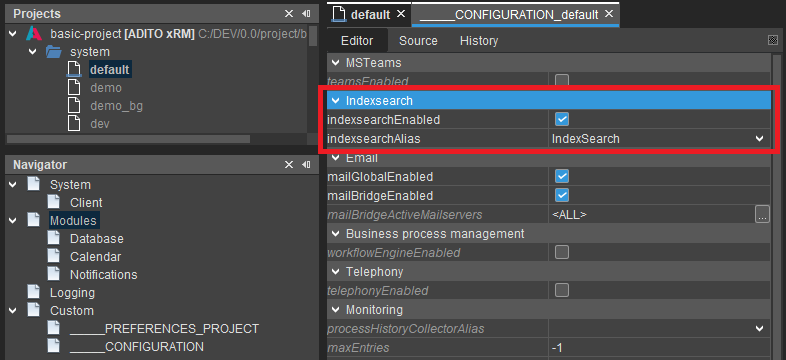 Figure: System configuration showing IndexSearch module settings
The indexsearchEnabled property must be set to true to activate the IndexSearch functionality. Additionally, the indexsearchAlias property must reference the correct alias configuration, typically set to IndexSearch for standard installations.
In managed ADITO systems, the IndexSearch alias configuration is maintained by the system operator and should contain all required settings for proper operation.
Alias Configuration Validation
The IndexSearch alias contains the detailed configuration parameters required for connecting to the Solr service and managing index operations.
Access the alias configuration through System | <My-System> | IndexSearch (or your custom alias name) in the Designer.
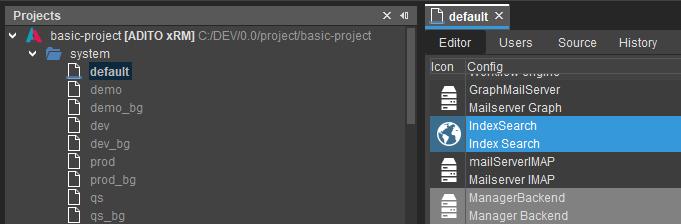 Figure: Location of IndexSearch alias configuration
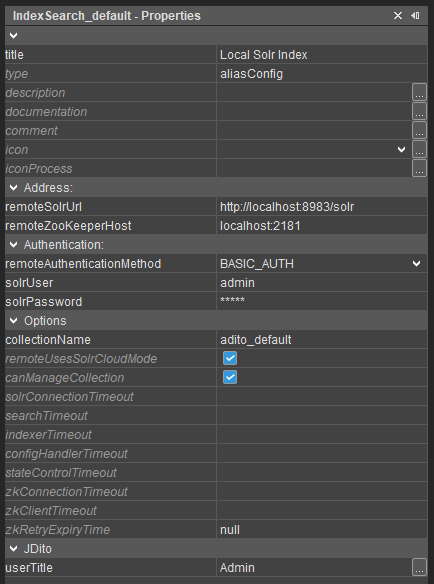 Figure: IndexSearch alias configuration properties
Solr Connection Configuration
The remoteSolrUrl property must contain a valid URL following the format http(s)://<Solr-Host>:<Solr-Port>/solr. Remove any trailing whitespace characters that may prevent proper connection establishment.
For legacy on-premise installations, verify that the Solr URL is accessible from the ADITO server environment. The configured SOLR_HOST must be reachable by all components including Solr, ZooKeeper, and ADITO server processes.
Configure the remoteZooKeeperHost property using the format <ZooKeeper-Host>:<ZooKeeper-Port>. Ensure that no trailing whitespace characters are present in the configuration value.
Authentication Configuration
Authentication requirements vary based on the ADITO version and deployment type. Managed systems and ADITO 2025 or later versions require basic authentication.
For managed systems, set remoteAuthenticationMethod to BASIC_AUTH. Use admin as the default username and retrieve the password from the System Service Portal under the system's Details tab.
Older unmanaged ADITO systems (version 2024 and earlier) typically do not require authentication. For these systems, set remoteAuthenticationMethod to NONE.
Collection Name Configuration
Systems with background servers require explicit collection name specification to ensure both web and background components use the same index collection.
Background server configurations (such as qs_bg or prod_bg) require a dedicated collectionName setting. Without this configuration, the system generates separate collections using the pattern <Project-Name>_<System-Name>, resulting in isolated indexes such as basic_qs and basic_qs_bg.
Validate that collection names conform to Solr naming requirements:
- Names must begin with a letter (
[a-zA-Z]) - Names may contain only letters, numbers, and underscores (
[a-zA-Z0-9_]) - Examples of valid names:
myCollection,adito_2025,basic2024,xRM_basic_2025_qs - Examples of invalid names:
2025,_basic,_2025,adito_2025.1,adito@index
Canary systems can share collection names with their main system counterparts when both ADITO versions use compatible Solr versions and ConfigSets. Refer to the Versions and Dependencies documentation for compatibility information.
Cloud Mode Configuration
The remoteUsesSolrCloudMode property should remain set to true for all remote Solr configurations. This setting will be removed in future releases as ADITO no longer supports core mode for remote Solr services.
Collection Management Configuration
The canManageCollection property controls whether the ADITO server instance can create indexes and update ConfigSets in the Solr service.
For systems with a single ADITO server or systems without background servers, this property must be set to true.
For systems with background servers, activate this property only on the background server instance. Web systems with multiple pods can cause Solr failures and collection corruption if all pods attempt to reconfigure Solr during startup.
Ensure that alias configurations in both web systems (such as qs) and background servers (such as qs_bg) use identical settings. The only exception should be the canManageCollection flag, which should be active only in the background server configuration.
Background Server Collection Issues
Background servers may use incorrect collections when configuration inconsistencies exist between web and background components.
Identifying Collection Separation
The following symptoms indicate that web and background servers are using different collections:
Web servers cannot initialize indexes on new systems while background servers operate normally. Index functionality works only on web pods without background server integration. Data inconsistencies appear between web and background server indexes. Records imported through background processes are not available in web server searches. Background server processes cannot access index changes made through web interfaces.
Resolution Process
Verify that both web and background server alias configurations specify identical collectionName values. Deploy the corrected configuration and restart both server components to establish proper collection sharing.
Canary System Configuration
Canary deployments require careful configuration management to prevent index conflicts between production and canary environments.
Shared Collection Configuration
When default and canary systems use the same collectionName setting, version incompatibilities can cause operational failures.
Web interfaces in the default system may fail to execute searches or generate errors during query processing. Indexer components on both default and canary systems may encounter errors and fail to update indexes.
This typically occurs when Solr ConfigSet versions between ADITO versions are incompatible. Resolve this issue by updating the default system to a compatible version or implementing collection separation.
Collection Separation Strategy
For incompatible ADITO versions, implement separate collections by modifying the collectionName in the default system configuration. Establish periodic FullIndexer processes running every 1-2 hours alternately on both systems to maintain synchronization between the separated indexes.
Independent Collection Management
When default and canary systems use different collection names, data synchronization issues may occur if periodic synchronization is not properly configured.
Ensure that FullIndexer processes are configured on both systems with appropriate scheduling intervals. If incremental indexer issues affect either system, refer to the dedicated incremental indexer troubleshooting documentation for resolution steps.