RecordContainerCache
To improve performance for repeated requests of the same data, ADITO provides RecordContainerCache.
In ADITO, caching is always configured per RecordContainer. It is neither possible nor useful to cache "everything" globally.
Only data produced by the RecordContainer can be cached, whether it comes from a dbRecordContainer, including expression properties, or from a jDitoRecordContainer with its contentProcess. Data produced in an EntityField valueProcess cannot be cached, even if that process accesses the database directly, because it is not part of the RecordContainer.
Basics
In general, a RecordContainerCache is useful if
- the data is relatively static,
- the amount of data is manageable, and caching is only available for RecordContainers that are not pageable,
- the same set of data is requested repeatedly without changes, and repeated loading causes unnecessary system load.
- Example 1: Database load is unnecessarily high, and response times are affected.
- Example 2: Data is retrieved from an external web service and does not change frequently.
In the xRM project, common use cases are helper lists such as keywords, attributes, country data, languages, classifications, currency lists, rarely changing price lists, district definitions, and other configuration-related data.
Caching itself consumes system resources, especially RAM. Before enabling it for a RecordContainer, analyze actual user behavior and the available memory carefully.
SELECT COUNT queries are generally excluded from caching. Find more information in COUNT queries.
Setup
By default, a RecordContainer does not use a cache. To enable caching, configure the following two RecordContainer properties in the Cache section of the Properties view:
cacheTypecacheKeyProcess
Because caching is not available for pageable RecordContainers, these properties only exist if isPageable is set to false.
In addition, the project property maxEntryLifetimeInCache limits the lifetime of a cache entry.
cacheType
The following cache types (scopes) are selectable:
NONE: No caching. This is the default for new RecordContainers.SESSION: A separate cache store is created per user session. This is useful if individual users repeatedly request different datasets.GLOBAL: A shared cache store is used for all users and sessions. If one user loads a dataset first, later requests by other users can reuse the cached result instead of querying the database again.
In most cases, GLOBAL is the most suitable option. This also applies in multilingual projects as long as the cache key includes the locale.
cacheKeyProcess
A cache store is essentially a set of key-value pairs. The key uniquely identifies a specific data request, and the value contains the resulting data. cacheKeyProcess must therefore generate a stable and unique key for the requested dataset. If the same data is requested again later, the same key allows the RecordContainer to load the data from the cache instead of from the original source.
When constructing the cache key, include every factor that influences the generated data:
-
Components that determine, filter, or restrict the data:
- Lists of IDs to be included or excluded in the data query
- Filters (user filters, search filters, permission filters, etc.)
- Parameters evaluated in, e.g., the conditionProcess (dbRecordContainer) or
rowCountProcess/contentProcess(jDitoRecordContainer).
-
Components that influence the presentation of the data:
- Language: Often relevant with RecordContainers, especially during translation of display values (e.g., Keywords).
- Region: Can be significant in specific cases.
- Sorting
- Grouping
Helper functions
Although, in principle, you are free to construct the cache key as you like (as long as uniqueness is ensured and as long as the same request for a specific set of data always results in the same cache key), it is strongly recommended to utilize the specific helper functions provided by the ADITO platform:
The ADITO library "CachedRecordContainerUtils_lib" (module utility)
already includes a helper class named CachedRecordContainerUtils that consists of several helper functions. These functions return a key string that can be used as result of the cacheKeyProcess. The helper functions read the values of various variables (lists of IDs, filter configurations, etc.) or Parameters and integrate these values into the key. Examples: $local.idvalues, $local.filters, or $param.OnlyActives_param.
If, at the time of the data request, a variable does not exist oder if it contains no value, its name is used instead of the value - which contributes to the requirement to make the key string unique.
All variable values/names are concatinated using a dot (".").
The following helper functions exist:
getKeyis the basic function. It enables you to define the complete key by yourself (via arbitrary variables as arguments) without the requirement to construct the string manually. In practice,getKeyis seldomly used directly in acacheKeyProcess; rather, it is internally called by the other helper functions (see below).getKeyWithPresetis used, if you want the cache key to respect all criteria that usually influences data, e.g., specific IDs, filters, sortings, and groupings.getKeyWithPresetinternally calls functiongetKey, using the following arguments: ** (mandatory:) a predefined set of variables (= "preset"), to be specified via a constant defined in classCachedRecordContainerFieldPresets(also part of CachedRecordContainerUtils_lib (module utility) ). In particular, the following constants are available: ***STANDARD: includes the variables$local.idvalues,$local.idvaluesExcluded,$local.filters,$local.order, and$local.grouped. ***STANDARD_WITH_LOCALE: includes all variables of constantSTANDARDplus (if present) the variable$sys.clientlocale. ** (optionally:) an arbitrary number of additional variablesgetCommonKeyinternally calls functiongetKeyWithPreset, using the constantSTANDARD_WITH_LOCALE(see above). Optionally, you can specify an arbitrary number of additional variables as arguments.
These functions are well-documented: You can learn how to use them by reading their JSDoc. Furthermore, you can learn how they construct the cache key string, by inspecting their source code in the CachedRecordContainerUtils_lib (module utility) .
Examples in the xRM project
Examples of the design of a cacheKeyProcess can easily be found, if you simply search the complete xRM project for the string "CachedRecordContainerUtils.get".
Here is an example, used in the jDitoRecordContainer of Attribute_entity (module attribute):
import { result } from "@aditosoftware/jdito-types";
import { CachedRecordContainerFieldPresets, CachedRecordContainerUtils } from "CachedRecordContainerUtils_lib";

var key = CachedRecordContainerUtils.getCommonKey(
    "$param.AttributeCount_param",
    "$param.ChildId_param",
    "$param.ChildType_param",
    "$param.FilteredAttributeIds_param",
    "$param.GetOnlyFirstLevelChildren_param",
    "$param.IncludeParentRecord_param",
    "$param.ObjectType_param",
    "$param.ParentId_param",
    "$param.ParentType_param"
);
result.string(key);
Another example can be found in the dbRecordContainer of ResourcePlanning_entity (module resource-operation):
import { CachedRecordContainerUtils } from "CachedRecordContainerUtils_lib";
import { result } from "@aditosoftware/jdito-types";

var res = CachedRecordContainerUtils.getCommonKey(
    "$param.OrganisationContactIds_param",
    "$param.PersonContactIds_param",
    "$param.ResourceOperationIds_param"
);
result.string(res);
You can improve your understanding of the generation of the cache key by debugging or logging the results of the cacheKeyProcesses of various RecordContainers of the xRM project, in order to observe the generated key and its structure. Simply play around with, e.g., the filter in the web client, and see how the content of the key changes.
Furthermore, for testing purposes, you can also add (further) arguments to one of the helper functions (see above), e.g., new variables or Parameters. Keep in mind that the cache key will only change, if a variable/Parameter actually influences the SQL statement that retrieves the data.
Logged example
Let's, for testing reasons, include a logging in the dbRecordContainer of KeywordEntry_entity (module keyword):
import { CachedRecordContainerFieldPresets, CachedRecordContainerUtils } from "CachedRecordContainerUtils_lib";
import { logging, result } from "@aditosoftware/jdito-types";

var res = CachedRecordContainerUtils.getCommonKey(
    "$param.ContainerName_param",
    "$param.BlacklistIds_param",
    "$param.OnlyActives_param",
    "$param.WhitelistIds_param",
    "$param.Locale_param"
);

logging.log("------> Keyword Entry (db) Cache Key: " + res);

result.string(res);
Furthermore, make sure that the logging of database queries is active (see chapter Logging).
Now, open Context "Keyword Entry" and define, e.g., the filter "Keyword Category equal AddressType". Then apply the filter and watch the log. Among several other log entries, you should see
- the key string generated by the
cacheKeyProcess:
------------> Keyword Entry (db) Cache Key: en_US._____$local.idvalues._____$local.idvaluesExcluded.{"type":"group","operator":"AND","childs":[{"type":"row","name":"AB_KEYWORD_CATEGORY_ID","operator":"EQUAL","value":"AddressType","key":"1f700fd2-5295-43a9-95ad-e73add4b5086","contenttype":"TEXT"}]}.{}._____$local.grouped._____$param.ContainerName_param._____$param.BlacklistIds_param.false._____$param.WhitelistIds_param._____$param.Locale_param
- the database query used to load the filtered data:
SELECT AB_KEYWORD_ENTRY.TITLE , AB_KEYWORD_ENTRY.SORTING , AB_KEYWORD_ENTRY.ISESSENTIAL , AB_KEYWORD_ENTRY.ISACTIVE , AB_KEYWORD_ENTRY.AB_KEYWORD_ENTRYID , AB_KEYWORD_ENTRY.KEYID , AB_KEYWORD_ENTRY.AB_KEYWORD_CATEGORY_ID , ( select AB_KEYWORD_CATEGORY.NAME from AB_KEYWORD_CATEGORY where AB_KEYWORD_CATEGORY.AB_KEYWORD_CATEGORYID = AB_KEYWORD_ENTRY.AB_KEYWORD_CATEGORY_ID ) AS CATEGORY_NAME FROM AB_KEYWORD_ENTRY WHERE AB_KEYWORD_ENTRY.AB_KEYWORD_CATEGORY_ID = '1f700fd2-5295-43a9-95ad-e73add4b5086' ORDER BY CATEGORY_NAME , AB_KEYWORD_ENTRY.SORTING , AB_KEYWORD_ENTRY.TITLE , AB_KEYWORD_ENTRY.AB_KEYWORD_ENTRYID
Subsequently, load the same data again, simply by clicking on the "refresh" button of your browser. Then, in the log, you can see the same key string again, but not the database query - which proofs that the cache is effective, as the repeatedly requested data has been loaded from the cache store, not from the database. Q.E.D.
Cache invalidation
In specific cases, it can be required to invalidate (= delete) the cache store (or parts of it) of a specific Entity. In particular, this is required, in order to avoid
- outdated cache store entries
- allocation of too much memory (RAM)
ADITO includes various automatisms and manual options in order to perform a cache invalidation, some of which refer to
- an individual cache store entry or
- the complete cache store of a specific RecordContainer or
- all cache stores of all RecordContainers of a project
Automatic
RecordContainer-specific
The ADITO platform includes an automatic cache invalidation, which is executed whenever data is changed (inserted, updated, or deleted) via a specific RecordContainer.
Example:
The dbRecordContainer of KeywordEntry_entity (module keyword) caches all requests of keyword entries. Now, when, e.g., the keyword entries of a specific keyword category have been cached (see RecordContainer cache example) and later the user adds a further keyword entry refering to the same keyword category, then the cache store of the dbRecordContainer of KeywordEntry_entity (module keyword) is outdated and must be refreshed - which is automatically initiated by the ADITO platform: The cache is deleted, in order to load the fresh data from the database (and cache it again), as soon as a user requests data of KeywordEntry_entity (module keyword) again. Thus, the cache store is now refreshed and provides the correct data for further requests.
Timespan-related
maxEntryLifetimeInCache is a project-related property (see project tree: preferences > PREFERENCES_PROJECT), which defines the amount of time an individual cache entry remains in any cache store of any Entity. Here, you can optionally change the default value to a value more suitable for your project. The property description explains the syntax, e.g., "1D 42M" means "1 day and 42 minutes".
This value needs to be set with great care:
The larger this time span is,
- the more data requests (cache store entries) are collected in the cache store, and thus the higher ("wider") is the effect of the cache; but
- the more memory (RAM) is required, and
- the higher is the probability that the user works with outdated data (in cases when, by mistake, there is neither an automatic nor a manual cache invalidation, see the other sub-chapters of this topic)
The smaller this time span is,
- the less data requests (cache store entries) are collected in the cache store, and thus the lower ("narrower") is the effect of the cache;
- the less memory (RAM) is required, and
- the lower is the probability that the user works with outdated data (in cases when, by mistake, there is neither an automatic nor a manual cache invalidation, see the other sub-chapters of this topic)
Therefore, the value of maxEntryLifetimeInCache needs to be set strictly according to the usual influencing factors, particularly
- the expected user behaviour, e.g.,
- the expected frequency of data changes;
- the expected kind and frequency of data requests;
- the memory (RAM) available for the ADITO system.
Manual
Besides the built-in automatic cache invalidation (see above), there are cases that require a manual cache invalidation. In particular, these are cases in which
- data is changed (inserted, updated, deleted) independent from the invalidation automatisms of the RecordContainer. This happens, e.g., when the database is modified via direct SQL statements (using, e.g.,
db.XXXmethods or the SqlBuilder), instead of using the RecordContainer-utilizing methods of Write Entity. A common use case is the inserting, updating, or deletion of data via an importer, which (for performance reasons) might use direct SQL statements. - the change of data of a specific Entity influences another (dependent) Entity. Example: If you add a new keyword category via the KeywordCategoryEdit_view, then the cached list of available keyword categories shown in the KeywordEntryEdit_view needs to be updated, in order to include also the new keyword category (see code example below).
In these kinds of cases, method invalidateCache(<name of Entity>, <name of RecordContainer>) must be executed. Here is an example from the ADITO xRM project:
import { entities } from "@aditosoftware/jdito-types";

//dependecies are updated so the cache needs to be updated
entities.invalidateCache("KeywordEntry_entity", "db");
If (in rare cases) it is required to invalidate all RecordContainerCaches of the complete project, simply execute method invalidateCache() without arguments. Here is an example from the ADITO xRM project, where a specific server process uses this method call:
import { entities } from "@aditosoftware/jdito-types";

entities.invalidateCache();
Shared caching with multiple ADITO servers
If your system includes multiple ADITO servers, it would be negative, if each server used only its own local cache store, independently from the cache stores of the other servers. In this case, server A had no information what happens on server B, and vice versa.
Rather, a shared (remote) cache must be applied, by utilizing a remote cache server. This server makes sure that all data requests in all sessions use one single (shared) cache store. (To be more precise: Internally, every server still has a local cache, called "NearCache", in order to reduce latency for accesses of the remote cache - but this architecture can be ignored here; it is enough to imagine the remote cache server as providing one single cache store, shared between all sessions of all servers.)
Example:
Given, in a multi-server environment, a cache of type GLOBAL has been configured for the RecordContainer of a specific Entity. User A logs in, which opens a session on, say, server A; user B logs in, which opens a session on, say, server B. Now, if user A requests a specific set of data of the respective Entity, then these data are loaded from the database and cached. Now, if every server used its own local cache and user B, subsequently, requests the same set of data, then the data would, again, be loaded from the database and cached a second time, this time on server B. If, however, the ADITO system utilized a remote cache server, then the data requested by user A would be stored in the shared cache store, and the (same) data requested by user B would be found and loaded from there - not again from the database.
Using a shared cache only makes sense for caches of type GLOBAL. Caches of type SESSION are always restricted to one single session, and caches of other sessions are ignored, be they running on the same server or on other server - even if a remote cache server is active.
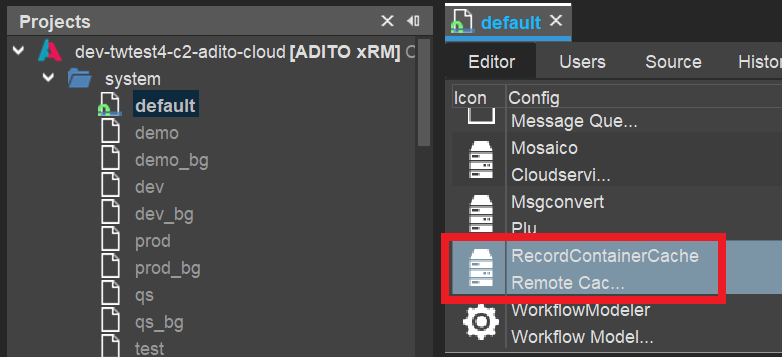
Therefore, each managed ADITO cloud system, by default, comes with an alias for a pre-configured, ready-to-use remote cache server. Its alias is named "RecordContainerCache" - see the AliasConfig (double-click on system > default, after the tunnel has been established):
If this remote cache alias is not present yet, you need to add it first:
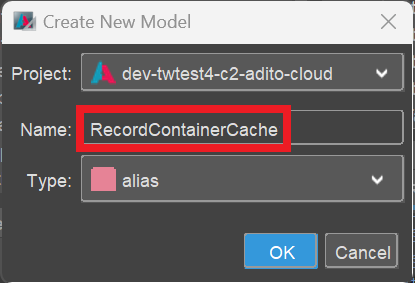
- In the project tree, right-click on node "alias" and choose "New" from the context menu.

- A dialog named "Create New Model" appears. Here, type in a suitable name (e.g., "RecordContainerCache").
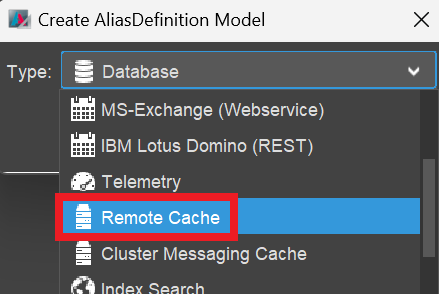
- A dialog named "Create AliasDefinition Model" appears. Here, select the type "Remote Cache".
- Deploy your project. Then, the new alias appears in the AliasConfig.
Now, check if the cache alias is set as value of the project property "recordContainerCachingAlias" (see preferences > ____PREFERENCES_PROJECT, in the project tree):
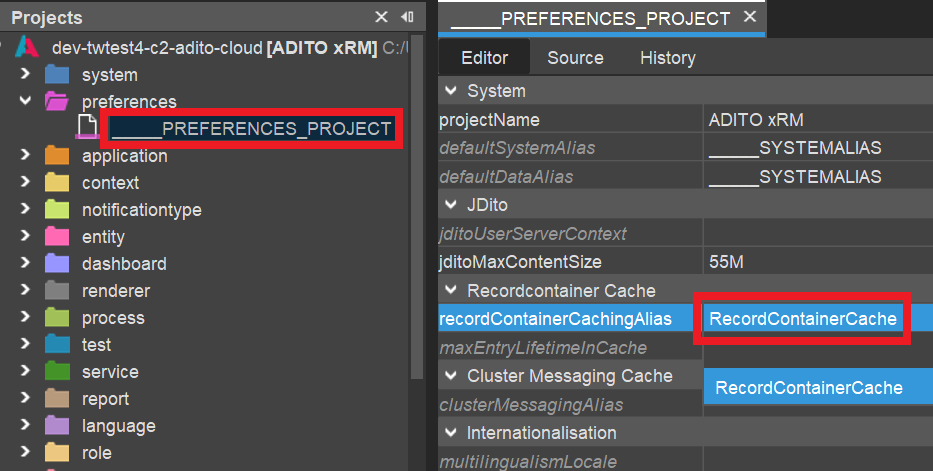
If it is not set yet,
- set it now,
- deploy your project,
- restart the ADITO server,
- re-establish the tunnel to your cloud system,
- reconnect to your your system, in order to see the AliasConfig again.
Now, if you click on the cache alias in the AliasConfig, you can inspect its properties in the "Properties" window. Here, you should see that the address of the cache server (properties "host" and "port") has been set automatically:
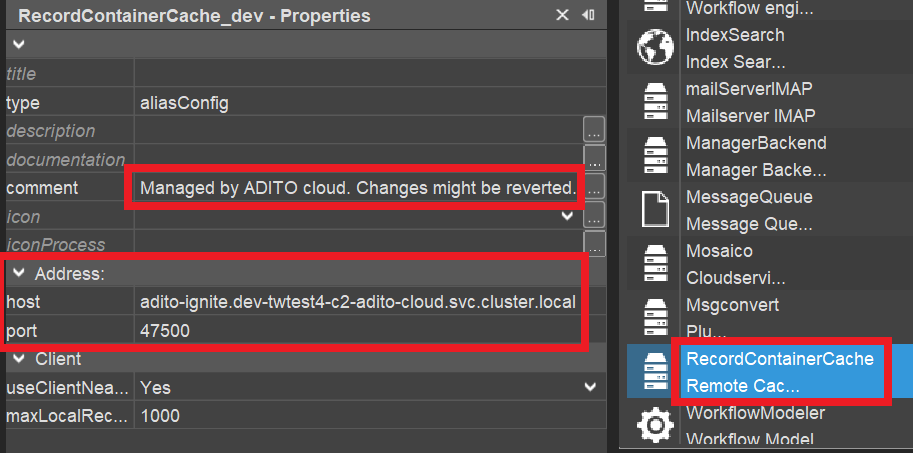
This semi-automatic activation of a remote cache server only works for managed ADITO cloud systems, as these systems by default come with a pre-configured, ready-to-use installation of a remote cache server. If, however, your system is an unmanaged cloud system, you first need to order the transformation of your system to a managed cloud system from ADITO.
ADITO does not offer support of integrating remote cache servers into "on premise" (not cloud-based) systems. Although, in principle, this is possible, the installation of the cache server and its integration as remote cache server must be realized by the customers themselves.
Alternative cache servers
By default, every managed ADITO cloud system comes with an installation of Apache Ignite as pre-configured, ready-to-use remote cache server. (Besides, ADITO utilizes Ignite also as cluster messaging server, see chapter Notifications with multiple ADITO servers.) In principle, you can also use other kinds of remote cache servers, but their installation and integration is not supported by ADITO (besides providing properties for the remote cache server's host and port; see above).