Value and DisplayValue
Every EntityField can have 2 kinds of values:
- "value":
This is the internal value of the EntityField, used for storage, calculations, dependencies, etc. - "displayValue":
This is the value displayed in the client.
If no displayValue (2.) is defined, the value (1.) will be displayed.
Assignment
Both value and displayValue can be assigned in various ways:
- They can be loaded from a single database column, which is specified in the RecordContainer, via property
recordfieldof the respective RecordFieldMappingvalue/displayValue.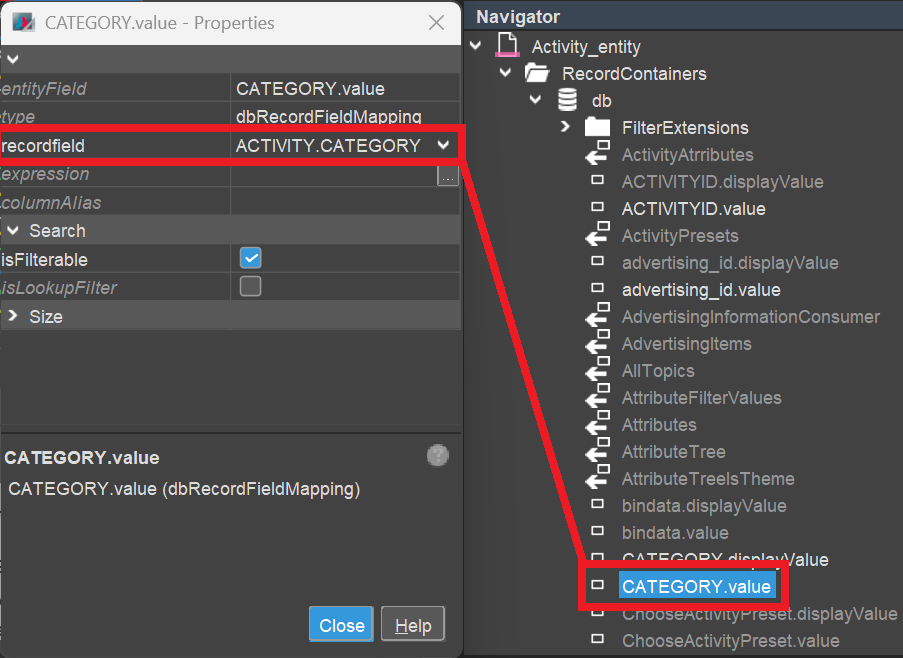
- They can be loaded or calculated via SQL code placed in property
expressionof the respective RecordFieldMappingvalue/displayValue.
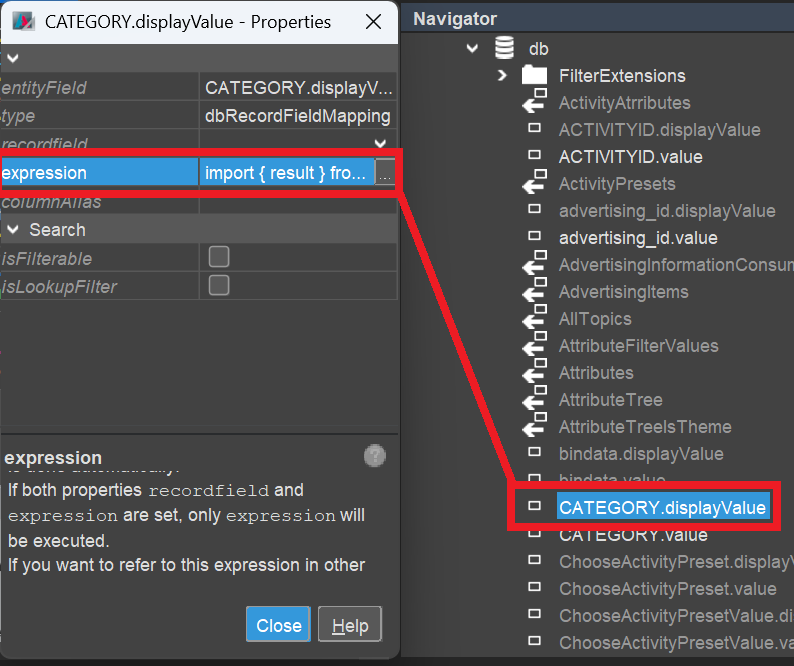
Theresultof theexpressionis added to the SELECT clause of the loading SQL, in brackets. Thus, you can place various kinds of code here, e.g.,- a subselect
- a calculation via SQL
- a combination of database columns
- fix values
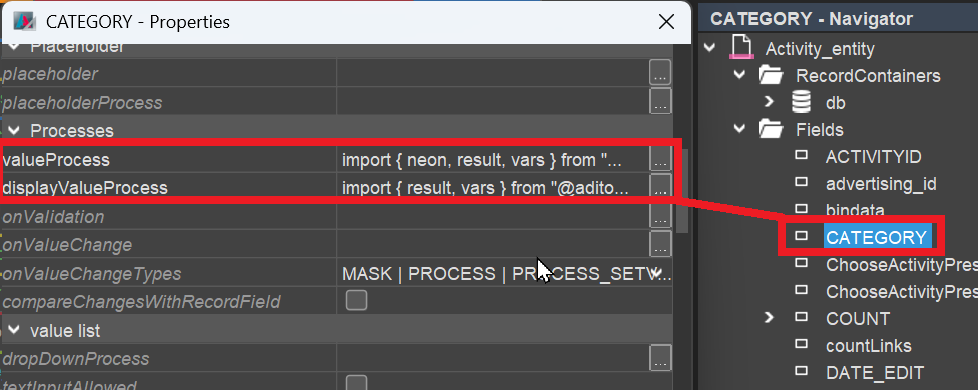
- They can be calculated via the EntityField's properties
valueProcess/displayValueProcess.
These processes can contain any JDito code, e.g., a complex calculation, with or without database access via theSqlBuilder.
The code of valueProcess / displayValueProcess is executed after the Entity's loading SQL, separately for every single dataset (row). Thus, you can run into severe performance issues, especially if the process is time-consuming and a large number of datasets is involved. Therefore, whenever an equivalent calculation can also be done via SQL, in the RecordContainer (property expression, see above) then it should be preferred.
4. A value (not a displayValue) can be also be set manually, via
a) the JDito command
vars.set("$field.MYFIELD", myFieldValue);
b) WriteEntity (respecting permission settings of client administrator)
Prioritization
If more than 1 of the above 4 ways are set, then the prioritization is:
4., 1., 2., 3.
Examples:
- If property
value.expression(2.) is able to retrieve a value, then the EntityField'svalueProcess(3.) will not be executed. - If property
displayValue.recordfield(1.) is able to retrieve a value, then bothdisplayValue.expression(2.) and the EntityField'sdisplayValueProcess(3.) will not be executed. vars.set("$field.MYFIELD", myFieldValue);overrides the current value in any case (while WriteEntity does it only if the permission settings allow it - find more information in chapter WriteEntity).
Access
value
You can access the value of an EntityField in 3 ways:
- Entity-wide:
vars.get("$field.MYFIELD"), which is the abbreviation ofvars.get("$field.MYFIELD.value") - EntityField-wide:
vars.get("$this.value") - System-wide via "LoadEntity". This is the only way that respects the permissions (access rights) set by the client administrator. Find more information in chapter LoadEntity.
Option 1. and 2. differ particularly in recordstate NEW and EDIT: 2. holds the most current value, i.e., the current user input in the client - while 1. is synchronized with 2. only at specific occasions, e.g., on "focus lost" of the input field. (VER)
Please refer to chapter Accessing the value of an EntityField for a detailed explanation of the topic.
displayValue
You can access the displayValue of an EntityField in 2 ways:
- Entity-wide:
vars.getString("$field.MYFIELD.displayValue"). (Unlike for the value, the displayValue can not be accessed viavars.get("$this.displayValue").) - System-wide via "LoadEntity". This is the only way that respects the permissions (access rights) set by the client administrator. Find more information in chapter LoadEntity.
You cannot load the displayValue via SQL, as it is always the value that is stored in the database. Exception: If the displayValue is explicitely related to a specific database column (via property recordfield in the RecordFieldMapping), you can, of course, load this database column.