Execution order of Entity processes
Load
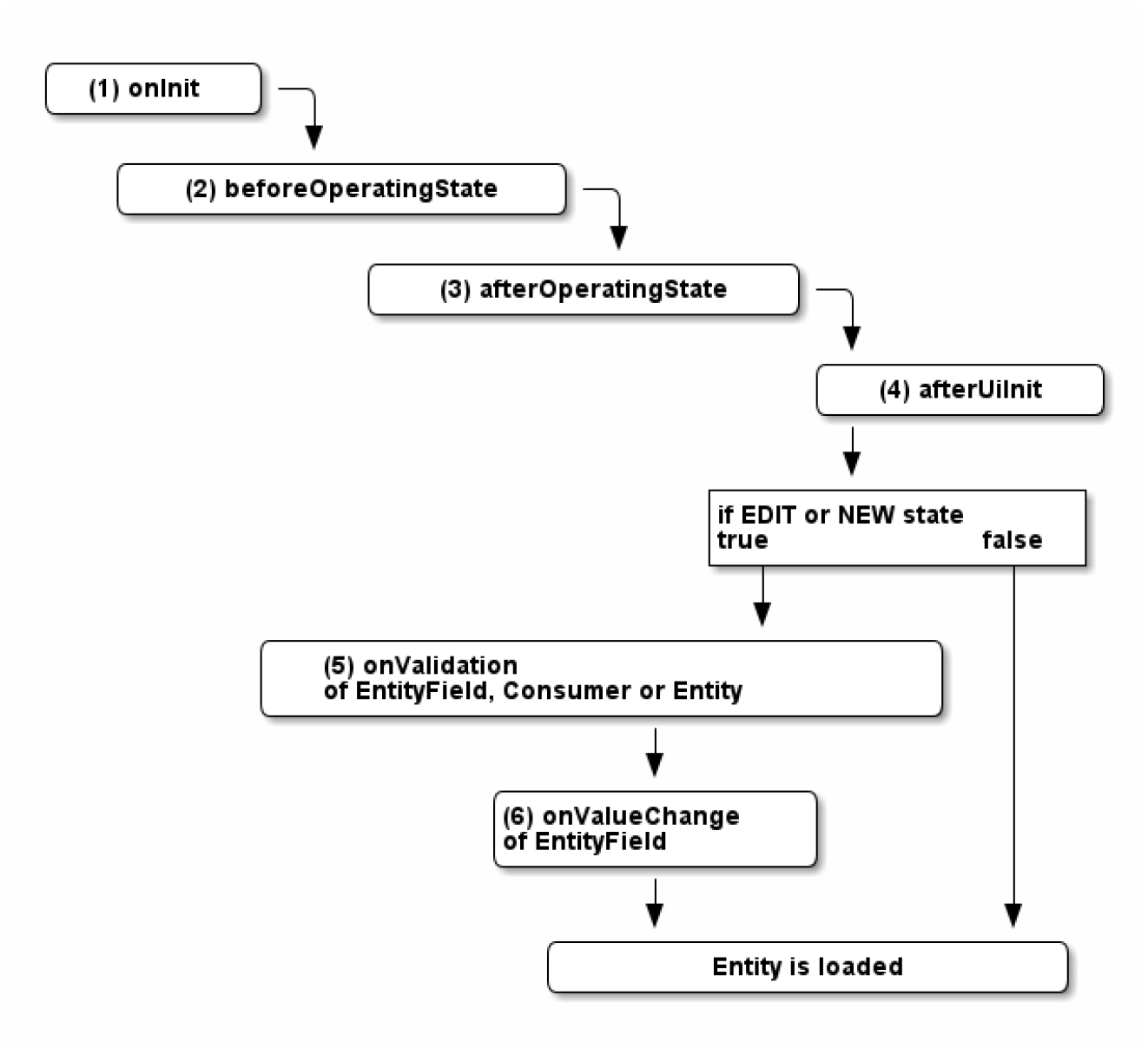
Execution order of processes when loading an Entity
- onInit
This process runs before the RecordContainer is loaded. Here you can initialize variables like$global.variablenameor$context.variablename. - beforeOperatingState
When this process runs, the Entity is already loaded, but is not in one of the operating states yet. (see chapter System State) - afterOperatingState
Here it is determined, which operating state is used, but no components are loaded yet. This is the place to react to changes in operating state. - afterUiInit
This process runs after the UI is loaded. Here you can use methods to influence the UI, i.e.neon.addRecordto add a new record to an Entity. - onValidation
In this process you can validate the data in the fields, before saving. This process should only be used to validate data. Don't react to changes here! If any text is given as result of theonValidationprocess, an automatism makes sure that- the validation is considered as "false";
- the given text is displayed to the right of the "Save" button;
- the "Save" button is disabled until the next call of the onValidation process.
- Example:
result.string("Your input must not include special characters like '&'.");
- onValueChange
In this EntityField process you can react to changes in an EntityField and, e.g., a computed value or set other components to inactive depending on the content.- With property onValueChangeTypes (in the EntityField's property sheet directly under property onValueChange) you can define the types of sources (modifiers) that will trigger the onValueChange process, e.g. "MASK" or "RECORD". Find more information about the selectable modifier types and their meanings in the property description of onValueChangeTypes.
- Variable
$local.modifiertypeholds the type of the modifier (source type) that has triggered the onValueChange process - see property description of onValueChangeTypes. This variable can be helpful, if multiple modifier types had been selected in property onValueChangeTypes, and a distinctive reaction is required, depending on the modifier type.
Save
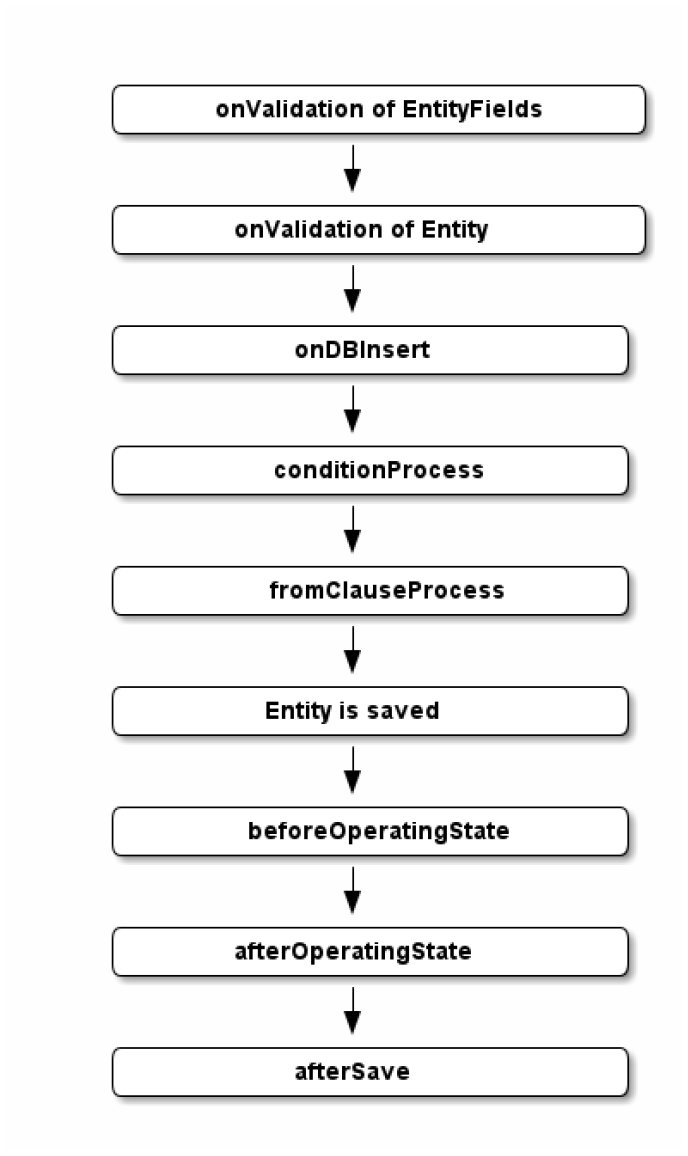
Execution order of processes when saving an Entity with a dbRecordContainer
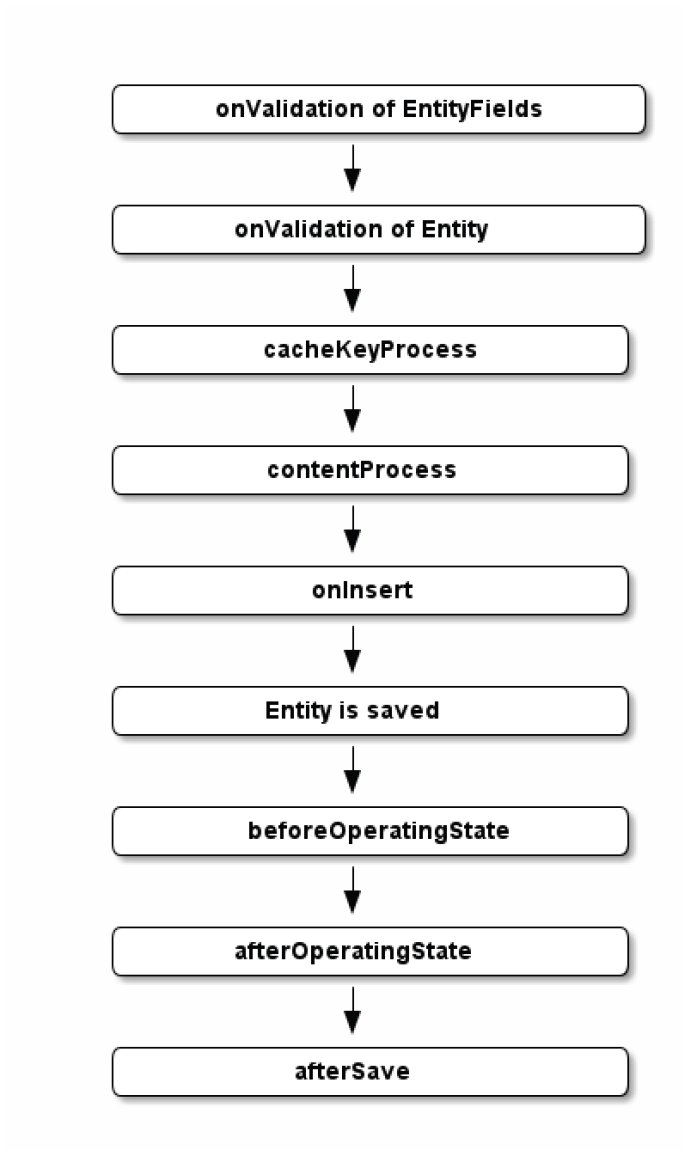
Execution order of processes when saving an Entity with a jDitoRecordContainer
You can find a description of these processes in their JSDoc and partly in the previous chapter about load processes. Here is some additional information:
-
afterSave
The afterSave process was implemented to execute client commands after saving a record of an Entity. In some cases, e.g., after saving, a popup message should be shown to the user, or another Context should be opened. To try the same in the onDBInsert/onInsert process, leads to problems:- Client commands (
neon.xxx,question.xxx) are not allowed to be executed in RecordContainer processes. (Entity can also be used server-side with "Read/Write Entity" methods, then the methods lead to errors.) openContextdoes not work or was "overwritten".
Therefore, the afterSave process was introduced, in order to allow the execution of these kind of actions after saving.- Please note the following:
- The afterSave process is exclusively executed client-side. Therfore, in this process, nothing must be changed/triggered etc. (processes, updates etc.). If this is nevertheless necessary, it must be done manually on the server side, e.g., in the on(DB)Insert process.
- If a new Context is opened in the afterSave process,
result.string(true);must be returned, in order to avoid the default behavior after saving.
- Client commands (